
IN-HOUSE GPT SOFTWARE
A voluntary initiative was launched, involving interested employees, including mainly developers, product and myself - to create an in-house GPT tool for wider colleague assistance. Given the low resources, we conducted regular informal knowledge-sharing and departmental needs mapping sessions. Based on this discovery, we executed a soft launch using 3 core GPT tokens to gather essential business-wide feedback;
-
A general enquiries service
A secure tool for users to ask general business questions and find problem-solving support, without the risk of data leakage
-
A HR policy advisor
Where users could get advice about HR policies and principles
-
A contract assistant
Provides assistance on obtaining key information out of long contracts, or advice on the best negotiation points
Challenges
Operating voluntarily and outside core hours presented significant scheduling hurdles, leading to inconsistent team attendance at our twice weekly 8am stand-ups. This lack of consistent synchronisation meant we struggled to maintain a clear structure or agreed-upon priorities, resulting in work being ready at different times.
Learnings / What we could have done differently
-
Structure: Dedicated collaboration within working hours instead of relying on fragmented, out-of-hours catch-ups.
-
Governance: Implementing a stricter priority list and greater adherence to jira tracking would have maintained consistency and reduced rework.
-
Focus Balance: We must actively guard against prioritising the "exciting" elements over completing the critical, foundational (but less glamorous) tasks.


WIREFRAME DEMO
We established the foundational elements for the MVP, prioritising immediate user needs and token capabilities for the planned soft launch. Initial UX elements included a password indicator and a required T&C acceptance on sign-up. The 3 GPT category options were designed for easy, navigable selection, pending the addition of clear helper text detailing each token's capability.

The prompt interface was designed with clear indicators for the three stages: provisional user input, generating response phase, and generated response phase. Following prompt generation, a feedback option was included, initiating a cycle that continued based on user input and satisfaction.
PROMPT JOURNEY SCREENS
GPT Sign Up Screen
Feedback mechanism included to gather improvements at this early stage
Notification informing users of accessibility of the GPT software
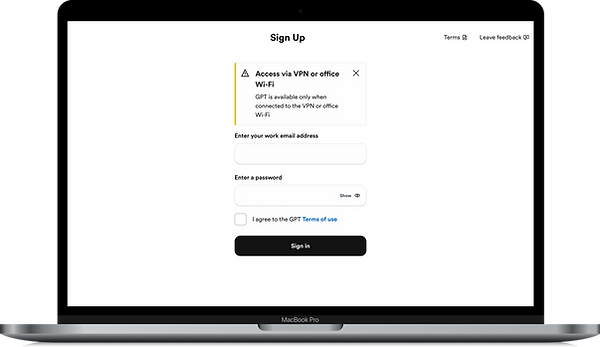
Users must check the box to accept the terms, which are available for review
Instructional header
1 / 6
FEEDBACK SCREENS
Feedback form
The feedback form opens in a sheet, providing helper text to guide submissions and input boxes for supporting comments

1 / 2
USER PROFILE SCREENS
New user profile
In the absence of new user data, the screen is limited to core configuration options: dark mode preferences and a sign out option.
